
Buying guides
PoE Extender: Run a PoE Camera Past the 100 m Limit
PoE cable is specified for 100 m. A PoE extender passes power and data further, if your switch budget and cable allow it.
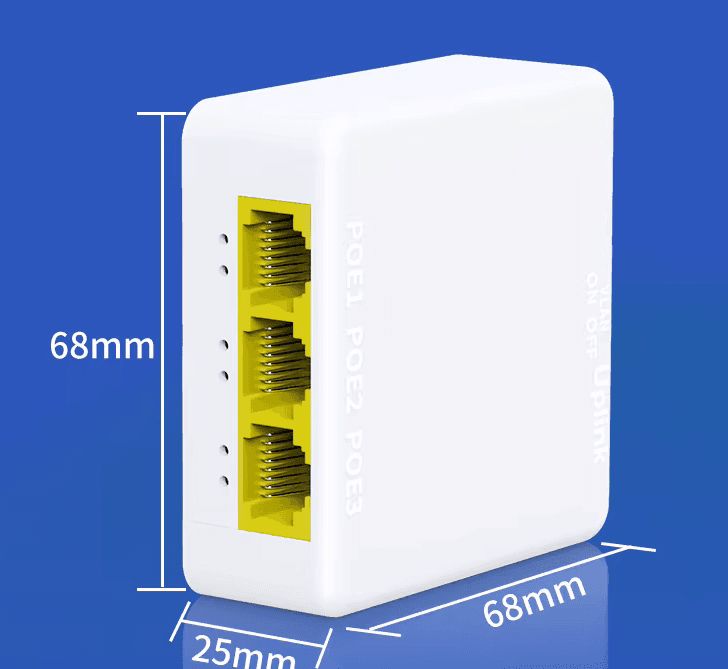
Standard PoE over Ethernet cable is specified for runs of up to 100 metres between the switch (or recorder) and the camera. That limit comes from the IEEE 802.3 Ethernet standards, which cover both the data link and the IEEE 802.3af and 802.3at PoE power. If a camera sits further away, a PoE extender (also called a PoE repeater) takes the power and data from the cable and sends them on down another run, so you do not need a new power point at the far end. The details are below, along with what to check before you buy and when another approach suits you better.
How far can a PoE cable run?
A copper network cable carries both the video data and the camera's power. Past 100 metres the signal weakens and the voltage drops, so a camera may reboot, drop its picture or not start at all. Keep each cable section within 100 metres, including the patch leads at both ends, and measure the real cable route rather than the straight line across the site. You can read the standard on the IEEE 802.3 Ethernet Working Group site.
How a PoE extender works
An extender sits in the middle of the run. It takes its power from the PoE port upstream of it, so it needs no plug-in supply of its own, then regenerates the data signal and passes PoE power to the next cable. Nothing needs configuring: you plug the upstream cable into the input port, the cable to the camera into an output port, and the camera starts as normal. Because the extender is fed by PoE, it cannot create power. The camera at the end shares whatever the first switch port supplies.
The listings for our units say the same thing in different ways. The PoE Extender 100m extends PoE power and data a further 100 metres, supports IEEE 802.3af and 802.3at and carries Gigabit data. The GoodTop 4-port Gigabit PoE extender has one input and three outputs, so one long cable can feed up to three cameras at the far end. It also supports VLAN isolation on the output ports and three levels of cascade, meaning extenders can be chained.
What to check before you add one
- The PoE budget of the switch. Add up the wattage of every camera on the switch, using each camera's datasheet, and keep the total under the switch's overall PoE limit. The camera beyond the extender counts too.
- The power the extender can pass on. The GoodTop 4-port unit accepts a maximum of 30W at its input and its total output is 25W, with a maximum of 15.4W on any one port. Add up the cameras you plan to hang from it and check they fit, and make sure the upstream port can supply 30W.
- The cable. The GoodTop listing asks for at least Cat5e and recommends Cat6. For outdoor sections, use cable sold for external use, such as the solid copper Cat6 and Cat5e boxes in Wire & Cable.
- The camera. It must be a PoE camera that runs on 802.3af or 802.3at power. A 12V camera cannot be fed this way.
Is there another way to go further?
Some PoE switches have a long-range mode. The Hikvision DS-3E0109P-E/M lists transmission of up to approximately 300 metres when its extended transmission mode is on, and its eight PoE ports are 10/100 Mbps. If you are replacing a switch anyway, that may be neater than adding a box in a cable run. See the PoE switches.
For a very long run, such as another building or the far end of a yard, a second PoE switch at that end is often better, fed by a single network cable or by fibre between the two points. A switch near the cameras gives you ports for several of them and its own power budget. An extender suits the case where one or a few cameras are just beyond the limit.
Installing it
Put the extender close to the 100 metre mark, not at the very end of the first cable, and keep it somewhere dry or inside a weatherproof enclosure. Test the camera from the extender with a short lead before you fit the final cable. Then check the recorder shows a steady picture for a day before you close the work up.