
Buying guides
Cat5e vs Cat6 for CCTV: Which Cable, Indoors and Out
Solid-copper Cat5e carries PoE and the picture for an IP camera up to 100 m. Here is when Cat6, Cat6A or shielded cable is worth it, indoors and out.
For a CCTV run of up to 100 metres, solid-copper Cat5e carries both the power and the picture for a PoE IP camera, and Cat6 is the better choice when you are pulling a cable you do not want to pull twice, when the run is close to the 100 metre limit, or when the cable passes through electrically noisy ground. Whichever you pick, buy solid copper, not copper-clad aluminium (CCA), and buy an external-grade sheath for any part of the run that leaves the building. This guide sets Cat5e, Cat6, Cat6A, shielded and CCA cable side by side, explains indoor and outdoor jackets, shows how much cable a given number of cameras needs and covers the RJ45 plugs and crimp tools to finish the job.
What PoE is, and why it sets the rules for the cable
PoE stands for Power over Ethernet. One network cable carries the camera's video data and its electrical power, so the camera needs no separate power adapter or nearby socket. The power comes from a PoE port on a PoE switch or on a recorder with built-in PoE ports. The camera must be a PoE model.
The cable matters more with PoE than with a plain data link, because the copper in the cable carries the camera's power as well as the picture. A thin or poor-quality conductor loses more of that power on the way. Standard PoE over Ethernet cable is specified for runs of up to 100 metres between the switch or recorder and the camera. Past 100 metres you should use a PoE extender. Measure the real route the cable will take, round corners and up walls, not the straight line across the site.
That 100 metre limit is the same for Cat5e, Cat6, Cat6A and shielded cable. A better category does not buy you extra metres. If a camera is further away than 100 metres, read our guide to PoE extenders, and use the PoE voltage drop calculator to see how a long run affects the power at the camera. To check that a switch has enough total power for all of your cameras, use the PoE calculator, or browse PoE switches.
Cat5e, Cat6, Cat6A, shielded and CCA at a glance
The table uses cables we stock as examples, so you can see the real specification behind each name.
| Cable | What it is | Where it goes | Maximum PoE run |
|---|---|---|---|
| Cat5e, solid copper | Four-pair U/UTP cable. The Excel external Cat5e has 24 AWG solid copper conductors in a PE sheath. | Indoors, and outdoors if the sheath is external grade | 100 m |
| Cat6, solid copper | Four-pair U/UTP cable. The Excel external Cat6 has 23 AWG solid copper conductors around a central X-shaped divider in a PE sheath. | Indoors, and outdoors if the sheath is external grade | 100 m |
| Cat6A, unshielded or shielded | Supports Gigabit and 10 Gigabit Ethernet. Our grey 305 m reel has an indoor jacket; the Connectix TruLAN Cat6A F/FTP has a PE sheath for ducts and outdoor runs. | Indoor grey jacket, or PE sheath for ducts | 100 m |
| Shielded (F/FTP, S/FTP) | Foil screening around each pair and around the whole cable, to reduce interference and crosstalk. | Noisy routes beside power cables or machinery | 100 m |
| CCA (copper-clad aluminium) | Aluminium core with a copper coating. Found in low-cost patch leads such as our 10 m white Cat6 lead. | Short patch leads only, never the fixed run | Keep fixed runs in solid copper |
| External, duct grade | PE-sheathed cable made for ducts, conduit, building exteriors and underground duct. | Any part of the run outside | 100 m |
| Armoured | We do not stock armoured network cable at the moment. | Ask us before ordering | - |
Is Cat5e enough for an IP camera?
Yes. Cat5e carries Fast Ethernet and Gigabit Ethernet at up to 1000 Mbps. The Excel external Cat5e is tested to ISO 11801 and ANSI/TIA Cat 5e specifications, and the Connectix external Cat5e is specified to exceed ANSI/TIA Cat5e performance requirements and is made for external links to IP cameras and wireless access points.
The speed of the cable is rarely the limit on a camera run. The recorder's or camera's menu shows the bitrate of each stream. If we assume 16 Mb/s for one high-resolution camera, a 1000 Mbps link has room for about 62 such streams (1000 divided by 16). Each camera has its own cable back to the switch, so a single run never carries more than that one camera. So the cable is not what limits the resolution of the camera you choose. The things that go wrong on a camera cable are length, connectors, the cable's material and damage, not the category number.
When Cat6 is worth choosing
Cat6 gives more headroom. Connectix describes its Cat6 cable as providing improved bandwidth performance compared with Cat5e. For a camera that headroom is spare capacity you will not use today, but it costs little extra work to fit, and it suits these cases:
- A cable you do not want to pull again. Through a loft, under a floor or in a duct, pulling the cable is the hard part. Putting in Cat6 while it is open means the same route can later carry a faster network.
- A run close to 100 metres. The limit is the same, but a run at 90 metres leaves little spare. Use good solid copper, keep the patch leads short and check the voltage with the PoE voltage drop calculator.
- A shared cabling job. If the same route will also serve a computer, an access point or a future faster device, Cat6 or Cat6A saves a second pull.
- Noisy routes. A shielded cable helps where it must run beside power cables; see the shielded section below.
Choose Cat5e when a run is short, the camera is a standard PoE model and the budget matters more than headroom. It does the job properly.
Cat6A and shielded cable: when you need them
Cat6A is built for Gigabit and 10 Gigabit Ethernet. Our Connectix TruLAN Cat6A is an F/FTP cable, which means each twisted pair is wrapped in foil and the whole cable has an overall foil screen. Connectix says the screening gives improved protection against electromagnetic interference and alien crosstalk, which suits installations where cables run in dense bundles or through electrically noisy places. Its heavy-duty PE sheath is described as suitable for ducting routes and for outdoor runs between buildings.
A camera does not need 10 Gigabit. Cat6A is worth it only when the same cable will also serve a faster network, or when the shielded construction solves a problem with interference. For a simple camera run, Cat5e or Cat6 is enough.
Our shielded Cat6 pass-through RJ45 plugs have a shielded metal housing that gives improved protection against electromagnetic interference. Shielded patch leads, like our Cat6 SFTP patch lead, use pair-in-metal-foil screening to reduce interference where network cables run alongside power cables.
Indoor and outdoor cable jackets
The category (Cat5e, Cat6) says how the cable performs. The jacket says where it can live. Check both.
- PVC jackets are for indoor use. Our grey Cat6A reel and our blue Cat6 SFTP patch lead are described for indoor installations.
- PE (polyethylene) jackets are made for outdoor use. The Excel external Cat5e and Cat6 have a PE sheath, and the Excel Cat5e is UV exposure tested to ASTM G154 and G155. The Connectix external Cat5e has a weather-resistant LDPE/PE sheath for ducts, building exteriors and catenary runs, and the Connectix Cat6 has a PE sheath for conduit, external walls and underground duct.
- LSZH jackets (low smoke, zero halogen) reduce smoke and harmful gases in a fire, and are suitable for enclosed public buildings such as offices, schools and hospitals. Our Connectix Cat5e LSZH patch cable is an example.
Never run an indoor-jacket cable outside, even in a short exposed section. The sheath is not made for sun and rain, and a cable that stops working there is hard to trace later. If the run is mostly inside and a short length is outside, use external-grade cable for the whole run, or join to it through a proper junction box. See our junction box guide for how to do that neatly.
External cable: duct grade or armoured
External cables in our range are duct grade. That means a PE sheath for conduit, ducts and building exteriors, not a metal armour layer. The Connectix Cat6 is described as suitable for outdoor routing through conduit systems, external walls and underground duct installations. For a buried run, pull the cable through a duct rather than burying it bare.
We do not stock armoured network cable at the moment. If a run needs it, ask us before ordering. Connectix notes that how the cable is installed outdoors depends on the site requirements and local regulations, so check both.
The external choices:
- Excel external Cat5e, 305 m box: solid copper, 24 AWG, PE sheath, with the Fca reaction-to-fire class.
- Excel external Cat6, 305 m box: solid copper, 23 AWG, PE sheath, with the Fca reaction-to-fire class.
- Connectix external Cat5e, 100 m reel: solid copper with metre marking, a good size for a single long run or a smaller job.
- Connectix external Cat6, 305 m pull box: solid copper, PE sheath, supports PoE.
- Connectix TruLAN Cat6A F/FTP: shielded, PE sheath, for ducts and outdoor runs.
The Cat5e and Cat6 cables are in Wire & Cable, and the shielded and unshielded Cat6A cables are in Cat6A.
Solid copper or CCA: the cable fault you cannot see
Copper-clad aluminium cable has an aluminium core with a thin copper coating. Connectix states that solid copper has lower resistance than CCA alternatives, which matters on longer external runs and where PoE powers an IP camera. More resistance means more of the camera's power is lost along the cable, and a long PoE run can least afford that.
Our 10 m white Cat6 patch lead is a CCA cable, as its name says. It is described as economical, with basic CAT6 channel performance, and it is not recommended for PoE++ or 10GBase-T backbone applications. For anything fixed in the wall, ceiling or ground, we recommend solid copper instead.
How to avoid CCA by mistake:
- Read the product name and specification for the words "solid copper" or "pure copper".
- Treat "CCA", "copper clad" and "copper-clad aluminium" as a warning for fixed runs.
- Buy cable by the box or reel from a source that states the conductor material. The Excel and Connectix Cat5e and Cat6 reels and boxes above are all solid copper.
How much cable for how many cameras
Measure each camera's route from the switch or recorder to the camera, add 10% for the corners, loops at each end and the odd mistake, and add up the runs. The example below assumes an average route of 30 metres to each camera, which becomes 33 metres with the 10% allowance (30 x 1.1). Your own site's routes will differ, so use your own measurements.
| Cameras | Cable needed (33 m each) | Boxes and reels |
|---|---|---|
| 2 | 66 m | One 100 m reel |
| 4 | 132 m | One 305 m box, or two 100 m reels |
| 8 | 264 m | One 305 m box |
| 12 | 396 m | Two 305 m boxes |
| 16 | 528 m | Two 305 m boxes |
One 305 metre box covers up to 9 cameras at that average (305 divided by 33 is 9.2). Each camera still needs its own cable back to the switch or recorder, and each run must stay within 100 metres by itself. Cut each run from the box in one piece, with no joins.
Add the patch leads, the plugs and a PoE switch with enough ports. The PoE calculator shows how many cameras a given switch can power.
RJ45 plugs and crimping
If you use a box or reel, you fit the RJ45 plugs yourself. Do it carefully, because a wiring mistake at the plug is the most common reason a new cable run fails.
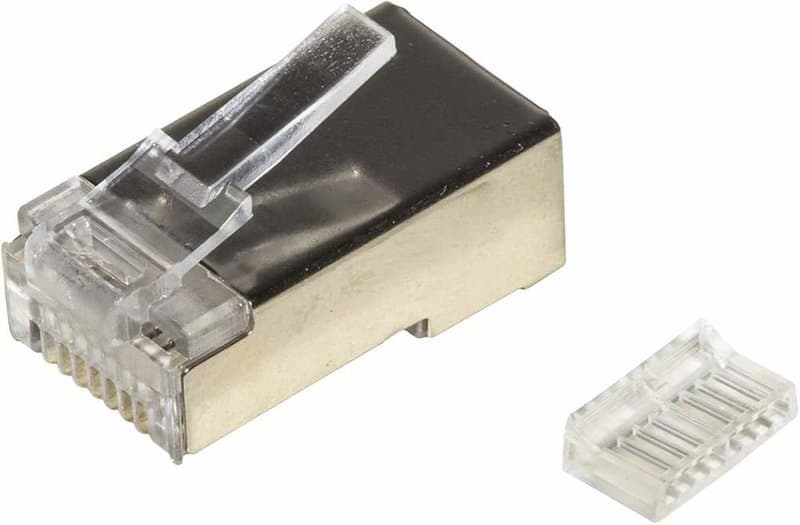
- Choose the plug to match the cable. Our gold-plated Cat5e RJ45 crimp plug suits Cat5e UTP cable. For Cat6, our Cat6 pass-through plug lets the conductors go right through the front of the plug before crimping, so you can check the wire order before you squeeze.
- Use one wiring standard at both ends. The plug supports T568A and T568B wiring. Pick one, our 10 m patch lead uses T568B, and use it at both ends.
- Strip carefully. A tool that cuts the outer jacket without nicking the conductors makes the difference between a good plug and a faulty one.
- Crimp with the right tool. Our pass-through RJ45 crimp tool terminates Cat6A, Cat6, Cat5e and Cat5 cable, and has a cutter and stripper built in. See all of our tools.
- Test it. A cable tester shows open circuits, short circuits, reversed connections and crossed wires before you climb the ladder. Our network cable tester does this for RJ45 cables, and there are more in testing tools.
More plugs and the other connectors are in Connectors. If your cameras are older analogue models over network cable, our balun guide explains how they use Cat5e or Cat6.
Mistakes to avoid
- Using CCA for the fixed run. It saves a little at the start and costs you reliability later. Use solid copper.
- Using an indoor jacket outside. Pick external-grade cable for any part of the run outside.
- Going past 100 metres. Keep every section to 100 metres. Measure the route, not the distance in a straight line.
- Crushing or kinking the cable. Do not pull the cable tight round a sharp corner, trap it under a clip that squeezes it flat or leave a kink in the route. Test every run after the cable is fixed, not before.
- Wiring the plugs differently at each end. Use T568A or T568B at both ends, not one of each.
- Skipping the test. A tester takes seconds; finding a bad plug in a closed ceiling does not.
- Running next to mains cable. Keep the network cable away from power cable, or use a shielded cable if there is no other route.
- Assuming a better category adds distance. It does not. The limit is 100 metres for each of them.
Which cable to buy: a short summary
- Short indoor run to a PoE camera: solid-copper Cat5e or Cat6.
- Outdoor run: external-grade Cat5e or Cat6 with a PE sheath, through a duct.
- A run near 100 metres, or a route you will not open again: solid-copper Cat6.
- A noisy route, or a network that will go faster later: shielded Cat6A.
- Patch leads between the switch and recorder: pre-made Cat6 leads.
- Armoured cable: ask us first.
Start with the Wire & Cable range, then work through the plugs and tools above. If you are not sure which cable fits your site, ask us before you order.
Parts named here
- Part number RJ45-CAT6-Pass-Through-8P8C-Shielded-100pcsCat6 Shielded RJ45 Pass Through Plug 8P8C, Pack of 100pcs, Metal Housing
- Part number CAT6-BLUE-SFTP-PIMF-PVC-26AWG-STRANDED-PATCH-CABLE-1M-REELCat6 SFTP PIMF Shielded Patch Cable, Blue, 26AWG Stranded Copper, PVC Jacket
- Part number CONNECTIX-CAT5e-U/UTP-LSZH-PURPLE-1MConnectix Cat5e U/UTP Network Cable 1m, LSZH Sheath, Purple, Solid Copper Cores
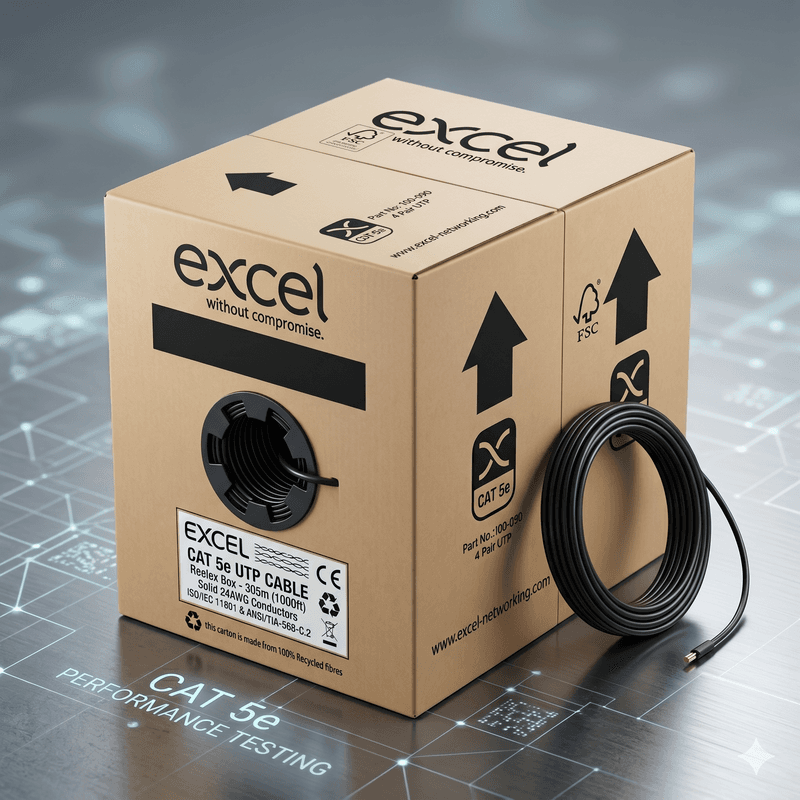
- Part number CAT5e-305M-PE-BLACK-Excel-solid-copperExcel External Cat5e U/UTP Network Cable, 305m Box, Solid Copper, Black PE, Fca
Frequently asked questions
Is Cat5e or Cat6 better for CCTV?
Solid-copper Cat5e is enough for a PoE IP camera up to 100 m. Cat6 gives more headroom for a run you will not pull again, or one close to the limit.
How far can a PoE camera cable run?
Up to 100 metres from the switch or recorder to the camera. Cat6 does not extend that.
Can I use CCA cable for a CCTV camera?
Only for short patch leads. Connectix says solid copper has lower resistance than CCA, which matters where PoE powers a camera, so use solid copper for fixed runs.
What cable do I need outdoors?
External-grade cable with a PE sheath, such as our Excel and Connectix Cat5e and Cat6, pulled through a duct. Never use an indoor PVC jacket outside.
Do I need shielded cable for CCTV?
Not usually. It helps on noisy routes beside power cables.
Part types on this subject
- Cat5e vs Cat6
- CCTV cable
- PoE cable
- RJ45
- Ethernet cable
Written by
CCTV Gear team